
Top-rated all-in-one MySQL IDE that makes any database task easier
Many database professionals and developers face challenges managing, designing, and optimizing their MySQL and MariaDB environments. To streamline your efforts and enhance your productivity, you need a powerful solution that covers all aspects of database tasks seamlessly. dbForge Studio for MySQL is a top-rated all-in-one IDE that empowers you with an extensive toolset designed to simplify database management and development. Whether you are a beginner or an experienced user, this versatile IDE ensures that every operation becomes intuitive and efficient.
Here’s Everything You Need to Work with MySQL Databases Most Effectively
To make the most of your MySQL databases, it’s crucial to utilize powerful tools that streamline your workflows. dbForge Studio for MySQL equips you with everything you need, from SQL development to data management, ensuring you can work efficiently and effectively.
SQL Development
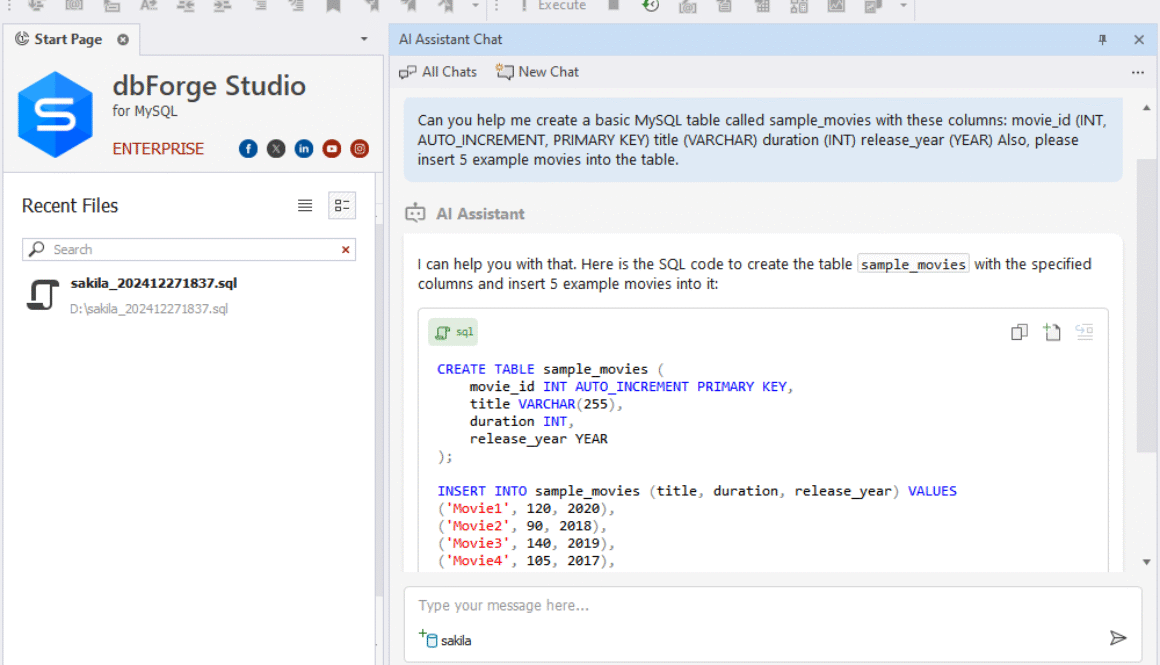
With dbForge Studio, you can enhance your SQL development experience through its intuitive interface and extensive functionality. The IDE simplifies tasks such as query editing, execution, and debugging, making it easier for you to focus on your code.
Database Design
Everything you need for robust database design is wrapped in dbForge Studio. This IDE allows you to develop and visualize database structures effortlessly, ensuring that your designs meet the ever-evolving requirements of your applications.
For instance, you can easily create and modify database schemas using the visual interface, which reduces the risk of errors and enhances your understanding of the database architecture. The built-in wizards guide you through complex tasks, allowing you to implement design changes quickly.
Data Management
Assuming you want to manage data seamlessly, dbForge Studio offers a plethora of features to organize, edit, and manipulate your datasets. You can handle large volumes of data with ease, minimizing manual effort.
The powerful data management tools allow you to perform bulk updates, data imports, and exports, ensuring your datasets are perfectly aligned with your business needs. You can also utilize advanced filtering and sorting capabilities to find the information you need quickly.
Database Management and Operations
With dbForge Studio, executing database management and operations has never been easier. The IDE provides a comprehensive suite of tools for monitoring performance and optimizing server configurations.
Database management features include performance tuning and maintenance capabilities that ensure your databases run smoothly. This allows you to focus on core development tasks while trustfully maintaining the integrity and performance of your databases.
Database Administration
If you are involved in database administration, dbForge Studio offers robust tools to ensure your databases are secure and optimized. Its user-friendly interface simplifies routine administrative tasks.
Management tasks such as user access control, backup and recovery, and server health monitoring are streamlined, enabling you to maintain a secure and efficient database environment effectively.
Data Analysis & Reporting
Management of data analysis and reporting is greatly enhanced when using dbForge Studio. You can create compelling visualizations and comprehensive reports based on your database queries.
Any kind of data analysis can be transformed into informative reports, allowing you to derive actionable insights from your data. This empowers you to make data-driven decisions that can positively impact your projects and strategies.
Automation
With the automation capabilities of dbForge Studio, you can save time and minimize errors in your database workflows. Automated tasks streamline maintenance and reporting processes.
Reporting routines and database operations can be scheduled, ensuring that you spend less time on repetitive tasks and more time focusing on optimizing your projects. Automation ultimately enhances efficiency and accuracy in your database management efforts.
The Studio’s Killer Feature: MySQL Source Control
After exploring the extensive capabilities of dbForge Studio for MySQL, one standout feature emerges that truly elevates your database management experience: MySQL Source Control. This functionality not only integrates seamlessly into your workflow but also ensures that your code is always under control, making collaboration and deployment a breeze.
Overview of Source Control Functionality
Source control in dbForge Studio allows you to manage changes to your database code efficiently. With built-in support for popular version control systems, you can easily track modifications, revert to previous versions, and maintain a history of all database changes. This ensures that your development process is structured and organized, simplifying coordination with team members.
Benefits of Using Source Control
There’s no denying the advantages of implementing source control in your MySQL database management. By incorporating this feature, you enhance your ability to manage changes effectively while minimizing risks associated with errors and data loss.
The incorporation of source control into your database workflow enables you to maintain a reliable history of changes, ensuring that you can always revert to a previous state if necessary. This is invaluable for collaborative projects where multiple developers may be working on the same codebase. Additionally, with source control in place, you can establish a more structured deployment process, as it allows you to track what changes are pushed to production and when. This leads to increased stability and a reduced likelihood of unexpected issues arising during deployment, ultimately enhancing your productivity and confidence in managing your MySQL databases.
Your Most Versatile Cross-Platform MySQL IDE
There’s no denying that a versatile IDE is crucial for any MySQL user, and dbForge Studio for MySQL stands out as a cross-platform solution that seamlessly caters to Windows, macOS, and Linux users. Whether you are developing a new application or managing legacy databases, you can enjoy consistent performance and user-friendly access regardless of your operating system.
Key Features
With dbForge Studio for MySQL, you gain access to a comprehensive suite of robust features designed to enhance your database management experience.
- Intuitive GUI for easy navigation and management
- Powerful SQL coding tools with code completion and syntax highlighting
- Data comparison and synchronization
- Visual database design and modeling
- Advanced reporting and analytics capabilities
- Cross-platform support for Windows, macOS, and Linux
- Comprehensive support for MySQL and MariaDB compatibility
- Data import and export tools for various formats
- Integrated database administration features
Any organization looking to optimize its database operations will find dbForge Studio an invaluable asset.
User Experience
With dbForge Studio, your user experience is greatly enhanced by a clean, intuitive interface that eases both newcomers and seasoned professionals into productive workflows. The design facilitates quick access to various tools, allowing you to focus on what matters most—your data.
A streamlined environment coupled with extensive documentation and support ensures that you can work efficiently and effectively. Whether you are designing new databases, executing complex queries, or generating insightful reports, dbForge Studio gives you the flexibility and power to maximize your productivity in database management.
Work with a Wide Variety of Databases and Cloud Services
Now, dbForge Studio for MySQL empowers you to manage and interact seamlessly with a multitude of database platforms, giving you flexibility in your development work. This versatility ensures that regardless of your project requirements, the IDE has the tools to accommodate your needs.
Supported Database Platforms
With support for popular MySQL and MariaDB versions, you can confidently work across various database systems. This compatibility allows you to design, manage, and migrate databases efficiently, saving you time and enhancing your productivity.
Cloud Service Integration
One of the standout features of dbForge Studio is its robust integration with various cloud services. This capability makes it easy for you to manage cloud-based databases directly from the IDE, ensuring you can take advantage of scalable solutions.
A wide array of cloud services are supported, allowing you to seamlessly connect to platforms such as Amazon RDS, Google Cloud SQL, and Azure Database for MySQL. This integration enables you to streamline your workflows, whether you’re developing on-premises or in the cloud, providing you with flexibility and scalability to adapt to your project’s needs.
Run dbForge Studio for MySQL on the Operating System of Your Choice
Your experience with dbForge Studio for MySQL is designed to be seamless, allowing you to operate on the operating system that best suits your preferences and workflow.
Windows
Even if you are a Windows user, dbForge Studio for MySQL delivers an intuitive interface and powerful features tailored for easy database management, enhancing your overall efficiency.
macOS
An outstanding option for macOS users, dbForge Studio for MySQL integrates smoothly into the Apple ecosystem, ensuring a user-friendly experience without sacrificing performance.
Your macOS experience will be marked by a sleek design and robust functionality, making it simple to manage your MySQL databases while enjoying the aesthetics and ease of use that macOS is known for. Features like advanced SQL editing and database comparison tools work flawlessly, empowering you to navigate through complex database tasks effortlessly.
Linux
With Linux, dbForge Studio for MySQL provides you with a powerful application that runs smoothly on various distributions, offering you flexibility and reliability in database management.
For instance, whether you’re using Ubuntu, CentOS, or another Linux distribution, dbForge Studio allows you to harness the full potential of MySQL database management without the usual compatibility hassles. Its robust toolchain supports your development and administrative needs while seamlessly integrating with the command line setups you prefer on Linux, ensuring a versatile and efficient working environment.
Get Started with the Studio at No Cost
Unlike many other IDEs that require upfront payments, dbForge Studio for MySQL offers a fantastic opportunity to explore its powerful features without any initial investment.
Free Trial
Clearly, you can experience the full capabilities of dbForge Studio through a free trial, allowing you to test various functionalities and assess how it fits into your workflow before making any commitments.
Benefits of the Free Version
While you may be cautious about exploring premium software, the free version of dbForge Studio grants you access to vital tools that can significantly enhance your database management skills and improve your overall productivity.
Cost efficiency is a key advantage of utilizing the free version. You can manage databases, design schemas, and even run queries without spending a dime. This is perfect for students or professionals starting out in SQL development, as it allows you to familiarize yourself with the software’s intuitive interface and robust features, ensuring you are well-prepared for future projects or potential upgrades without financial strain.
Need a Hand?
Once again, navigating the complexities of database management can be daunting. If you find yourself needing support, dbForge Studio for MySQL has you covered with a range of customer support options and community resources to make your experience smoother.
Customer Support Options
There’s a dedicated support team ready to assist you with any inquiries or issues you may encounter. Whether you have questions about installation, usage, or troubleshooting, dbForge Studio’s customer support channels provide timely and expert assistance.
Trusted by 35,000 Users Worldwide
Not only is dbForge Studio for MySQL a powerful tool for database management, but it has also gained the trust of over 35,000 users across the globe. This extensive user base underscores the reliability and effectiveness of the software in simplifying MySQL and MariaDB workflows, making it a favored choice for developers and database administrators alike.
User Base Overview
While dbForge Studio caters to a diverse audience, you’ll find its users ranging from independent developers to large enterprises. The versatility of the IDE meets various needs, ensuring that whether you are just starting out or are an experienced professional, you will find the tools necessary for your database projects.
User Testimonials
Little feedback from users highlights the positive experiences many have had with dbForge Studio for MySQL. The consistent praise centers around its user-friendly interface, comprehensive toolset, and exceptional support that transforms the daunting tasks of database management into a smooth and efficient process.
User testimonials emphasize how dbForge Studio has significantly enhanced their productivity and efficiency. Many users appreciate the software’s intuitive design, stating it allows them to focus on their projects rather than getting bogged down by complex database operations. This genuine appreciation from users showcases the IDE’s ability to effectively support your database needs while delivering a reliable and robust experience.
Awards & Recognition
For users seeking assurance of quality and performance, awards and recognition serve as a testament to dbForge Studio for MySQL’s excellence in database management solutions.
Notable Awards
Some of the accolades dbForge Studio has received over the years include the prestigious Software Product of the Year and Top MySQL Tool awards, highlighting its superior functionality and user-centric design.
Industry Recognition
On numerous occasions, dbForge Studio for MySQL has been recognized by industry experts and review platforms for its outstanding contribution to database development and administration.
It consistently earns high ratings from both users and reviewers, solidifying its place as a trusted choice among professionals. The IDE’s commitment to innovation, ease of use, and comprehensive feature set has positioned it at the forefront of database technologies, ensuring that you have the tools necessary for successful database management and development efforts.
Get More Solutions for MySQL
Your experience with MySQL can be vastly improved by utilizing advanced tools designed for specific tasks. Two vital features available in dbForge Studio for MySQL are Schema Compare and Data Compare, which empower you to manage and synchronize your databases efficiently. These tools provide you with robust solutions that can enhance your productivity and streamline your database operations.
Schema Compare
Any database development cycle necessitates the need for precise schema comparison. With dbForge Studio, you can easily identify differences between database schemas and apply changes seamlessly to ensure consistency across various environments.
| Quick detection of schema differences | Visual representation of changes |
| Automatic synchronization options | Version control support |
Data Compare
Solutions for data comparison are crucial for maintaining data integrity. By utilizing the Data Compare feature in dbForge Studio, you can effectively analyze and synchronize datasets between different databases, ensuring that you always have consistent and accurate data.
| Side-by-side data comparison | Detailed comparison results |
| Easy data synchronization | Filtering options for focused comparisons |
Compare various datasets with confidence, allowing you to quickly resolve discrepancies that may arise during migrations or updates. This feature not only saves time but also reduces the chance of errors in your data management process.
Data Generator
With dbForge Studio, you have an exceptional data generator at your disposal, which facilitates the creation of realistic test data to meet your development needs.
This feature allows you to generate massive datasets filled with customizable data according to your specifications. Whether you require specific formats, values, or patterns, the Data Generator can accommodate your requirements, enabling you to simulate real-world scenarios efficiently.
Feature-by-Feature Product Comparisons
Many users often struggle to choose the best MySQL IDE for their needs. This section breaks down key features, allowing you to assess how dbForge Studio for MySQL stacks up against others in the market.
| Feature | dbForge Studio for MySQL |
|---|---|
| User Interface | Clean and intuitive GUI suitable for both beginners and experts. |
| Database Design | Comprehensive tools for designing and altering database structures effortlessly. |
| Data Management | Robust features for storing, organizing, editing, and migrating datasets. |
| Performance Tuning | Full control over server configuration and performance optimization. |
| Cross-Platform Compatibility | Available on Windows, macOS, and Linux for versatile usage. |
Comparison with Competitors
Clearly, dbForge Studio for MySQL stands out among its competitors due to its user-centric design and extensive feature set. While other IDEs may focus on niche functionalities, the comprehensive nature of dbForge allows for a more holistic approach to database management.
| Competitor | Key Features |
|---|---|
| MySQL Workbench | Offers basic database design and development tools but lacks advanced data management features. |
| Navicat | Provides good cross-platform support; however, it may not be as feature-rich for performance tuning. |
| HeidiSQL | Lightweight and less complex, but limited in functional depth compared to dbForge. |
Key Differentiators
Differentiators are crucial in identifying what sets dbForge Studio for MySQL apart from the competition. Its robust toolset not only facilitates advanced SQL development but also emphasizes usability with a clean interface. Moreover, the extensive compatibility with popular cloud services further enhances its appeal for modern developers.
Competitors often provide fragmented solutions, but dbForge Studio’s inclusive features streamline your workflow effectively. Whether you need to design complex databases or manage server performance, this IDE holds the versatility and reliability crucial for your tasks. Additionally, its cross-platform compatibility ensures that you can run dbForge Studio on your operating system of choice, making it an ideal solution for diverse development environments.